
Hometether
from download to your own family TV help app.
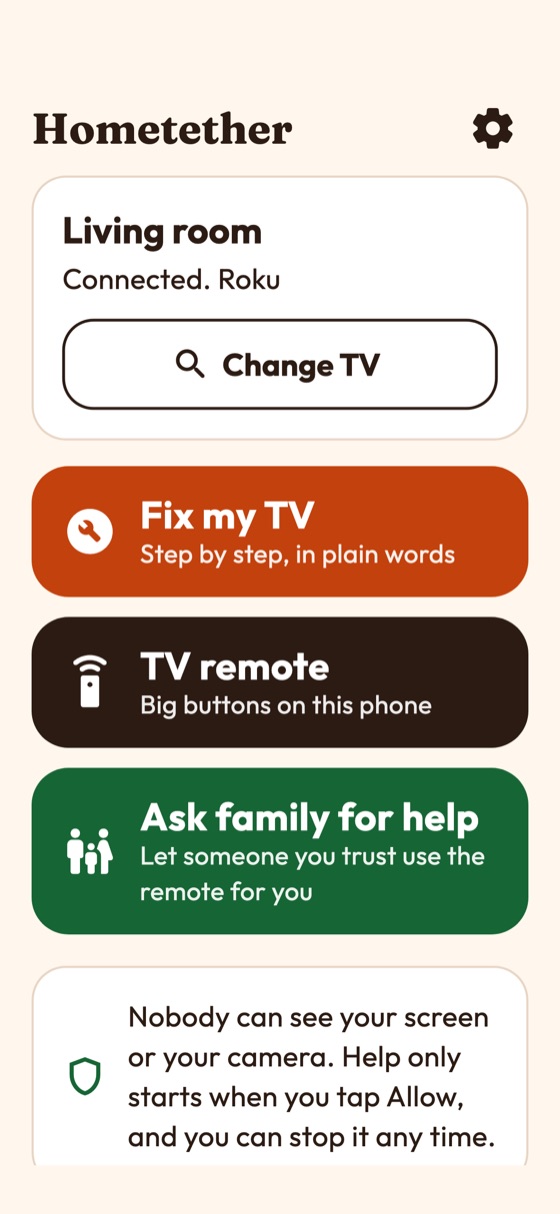
Hometether is an Android and iOS app that lets a grown-up child help a parent with the TV from far away, but only after the parent taps a big Allow help button. This guide takes you from the download to a branded build in the stores. Read it top to bottom the first time; after that, press / and search.
01What you bought
Hometether is complete, white-label source code: a Flutter app plus a Node.js server with an operator console. The parent's phone sits on the same Wi-Fi as the TV, finds it, and acts as the bridge. The helper's phone sends the remote through the server's relay. Nothing reaches the TV until the parent taps Allow help; a banner shows who is helping for the whole session, and one tap on Stop ends it. There is no screen sharing, no camera stream and no user accounts.
| Part | Folder | What it is |
|---|---|---|
| Mobile app | app/ | Flutter project for Android and iOS with a parent side (large type, warm, big buttons) and a helper side (dark remote). |
| Server | server/ | Node.js, Hono, SQLite and a WebSocket relay, with the operator console at /admin. Remote help needs it; the parent's own remote and the guided fixes work without it. |
| Contract | contract/CONTRACT.md | The exact API, the relay frames and the consent rule. |
02Declarations
AI declaration: AI tools were used to assist with parts of the code, documentation and graphics of this item. The author reviewed and tested the result. The product itself contains no AI features.
03Good to know before you buy
The Roku, Samsung Tizen and LG webOS support is written from public vendor documentation and published client libraries. It is checked against fake TVs in automated tests only. It has never run on a real TV. Expect to adjust details on first contact with your own TV model.
- Android TV and Google TV: found on the network, but control is not supported yet. The app says so.
- LG pairing uses an unsigned manifest. Some webOS versions may reject it.
- Not offered: Samsung app launch and typing, LG power on, Roku input switching, Wake-on-LAN.
- The parent's app must be open for help to start. There is no push notification to wake it.
- Not end-to-end encrypted. Traffic is protected by TLS (wss) and the server mints the session tokens. The relay can in principle see commands while they pass through; it stores none.
- iOS: finding TVs automatically needs Apple's Multicast Networking entitlement, which you request from Apple. Typing the TV address always works.
- Not included: store accounts, store products, release signing, hosting, a domain and HTTPS for the server, your own support, privacy and terms pages, store review. See Costs.
- Release builds are debug-signed as shipped, so they run; add your own signing before publishing (Release).
- No device other than the author's build machine ran the app: phones, QR scanning and real store purchases are yours to test. Details in Changelog.
04How it fits together
Only private LAN addresses are used for the TV, and no TV port is opened to the internet. The server never talks to a TV. See Relay.
05Folder map
| Path | What is inside |
|---|---|
app/lib/brand.dart | App name, tagline, accent colour, fonts, support/privacy/terms links, store product ids, server address, name shown on a Samsung TV's prompt. The one file for rebranding. |
app/lib/src/ | Dart code: core/ (commands, consent, config, fixes), relay/ (pairing and relay client), tv/ (Roku, Samsung, LG drivers, discovery), services/, ui/. |
app/android/, app/ios/ | Platform projects. iOS includes PrivacyInfo.xcprivacy. |
app/assets/fonts/ | Fraunces, Outfit and Bricolage Grotesque with their licence texts. |
server/src/ | TypeScript server: app.ts (routes), relay/, pairing.ts, limits/, purchases/, admin/manifest.ts (what the console shows). |
server/packages/admin-kit/ | The operator console, licensed with this item. |
server/.env.example, server/Dockerfile | Every server setting with comments; container build. |
06Quick start (about 20 minutes)
Run the shell commands on this page in WSL 2 (Ubuntu), not in PowerShell: install Node.js inside WSL for the server commands. Flutter can also run natively on Windows for Android builds; iOS builds need a Mac. macOS and Linux users can ignore this note.
- Install Flutter 3.41 or newer (see Requirements) and run
flutter doctoruntil it shows no red items for your platform. - Run the server.
Opencd server cp .env.example .env openssl rand -hex 32 # paste the result after ADMIN_SECRET_KEY= in .env npm ci npm run build npm starthttp://localhost:8787/adminand follow First sign-in. - Run the app.
Withoutcd app flutter pub get flutter run --dart-define=API_BASE_URL=https://your-server.exampleAPI_BASE_URLthe parent's remote and guided fixes work; remote help is off. - Rebrand: Rename and rebrand.
- Host the server behind HTTPS so remote help works on phones: Relay, Deployment.
- Create store products (optional): Store products. Build and publish: Release.
A read-only demo of the operator console: https://hometether-demo.mikodes.com/admin · Email: demo@hometether.demo · Password: hometether-demo-2026 (read-only demo account). The demo host serves plain HTTP only, so the relay (WebSocket) is switched off there.